What This Sheet Covers
The CompTIA A+ Core 1 exam (220-1201) is a scenario exam, but a large share of its scenarios turn on a number: which port a firewall rule must open, which cable category carries 10 gigabit over 100 metres, which RAID level survives one failed drive, why a workstation with a 169.254 address cannot reach the internet. The objectives document lists exactly which of those numbers are in scope, and this sheet collects them in one place — nothing here is outside the published 220-1201 objectives.
Memorise the tables, then test them under time pressure: our free CompTIA A+ practice questions are written against the same five domains and their weights, and every explanation says which objective the fact comes from.
The Exam Itself
| Item | A+ Core 1 (220-1201, objectives v2.0) |
|---|---|
| Questions | Maximum of 90, multiple-choice and performance-based (PBQs) |
| Time | 90 minutes |
| Passing score | 675 on a 100–900 scale |
| Domains | Mobile Devices 13% · Networking 23% · Hardware 25% · Virtualization and Cloud 11% · Hardware and Network Troubleshooting 28% |
| Recommended experience | 12 months in an IT support role |
| Certification | Core 1 plus Core 2 (220-1202), both required |
| Ports listed in objective 2.1 | 15 protocols, 18 port numbers — the whole list is below |
Objective 2.1: The Ports and Protocols
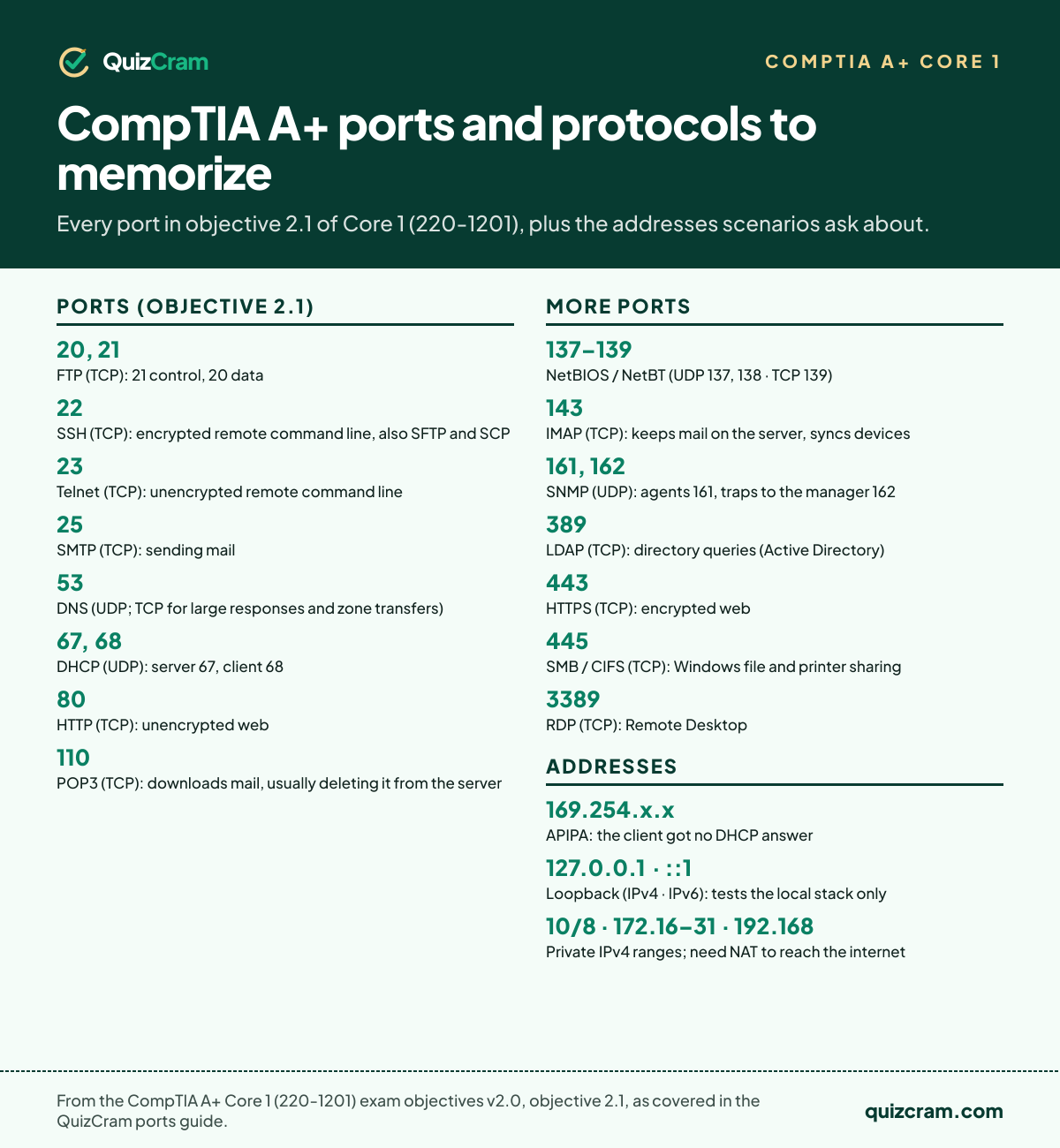
This is the complete list from the 220-1201 objectives. The exam does not ask about ports outside it, so learn these fifteen cold — including the two that come as pairs and the one that comes as a range.
| Port | Protocol | TCP/UDP | What it is for |
|---|---|---|---|
| 20, 21 | FTP | TCP | File transfer — 21 is the control channel, 20 the data channel |
| 22 | SSH | TCP | Encrypted remote command line (also carries SFTP and SCP) |
| 23 | Telnet | TCP | Unencrypted remote command line — the "insecure" answer |
| 25 | SMTP | TCP | Sending mail between servers and from clients |
| 53 | DNS | UDP (TCP for large responses and zone transfers) | Name to IP address resolution |
| 67, 68 | DHCP | UDP | Automatic IP addressing — server listens on 67, client on 68 |
| 80 | HTTP | TCP | Unencrypted web |
| 110 | POP3 | TCP | Retrieving mail; downloads and usually deletes from the server |
| 137–139 | NetBIOS / NetBT | UDP 137, 138 · TCP 139 | Legacy Windows name service and session support |
| 143 | IMAP | TCP | Retrieving mail; keeps messages on the server and syncs across devices |
| 161, 162 | SNMP | UDP | Device monitoring — agents on 161, traps sent to the manager on 162 |
| 389 | LDAP | TCP | Directory queries (Active Directory) |
| 443 | HTTPS | TCP | Encrypted web |
| 445 | SMB / CIFS | TCP | Windows file and printer sharing |
| 3389 | RDP | TCP | Remote Desktop |
A related set of numbers lives in objective 2.5 — the mail-related DNS records: MX names the mail server, TXT records carry SPF (which servers may send for the domain), DKIM (a signature proving the message was not altered) and DMARC (what to do when SPF or DKIM fail). A maps a name to IPv4, AAAA to IPv6, and CNAME is an alias to another name.
IP Addressing: The Ranges You Must Recognise
| Range | Meaning | What it tells you in a scenario |
|---|---|---|
| 10.0.0.0 – 10.255.255.255 (10/8) | Private, class A size | Internal address; needs NAT to reach the internet |
| 172.16.0.0 – 172.31.255.255 (172.16/12) | Private, class B size | Internal address — candidates forget the 16–31 limit |
| 192.168.0.0 – 192.168.255.255 (192.168/16) | Private, class C size | The usual home and SOHO range |
| 169.254.0.0 – 169.254.255.255 | APIPA (link-local) | The client asked DHCP and got no answer: check the DHCP server, the cable, the VLAN |
| 127.0.0.1 | IPv4 loopback | Tests the local TCP/IP stack only; a successful ping proves nothing about the network |
| ::1 | IPv6 loopback | Same idea in IPv6 |
| fe80::/10 | IPv6 link-local | Every IPv6 interface has one automatically; it is not routable |
| 255.255.255.0 (/24) | The common SOHO subnet mask | 254 usable hosts; two hosts with different masks on the same wire may not talk |
Objective 2.6 pairs these with the four settings every static client needs — address, subnet mask, default gateway, DNS server — and with DHCP terms: a scope is the pool, a lease is how long the client keeps the address, a reservation ties an address to a MAC, and an exclusion keeps addresses out of the pool for static devices.
Wireless: 802.11 Standards, Frequencies and Channels
| Standard | Wi-Fi name | Frequency | Maximum rate (theoretical) |
|---|---|---|---|
| 802.11a | — | 5 GHz | 54 Mb/s |
| 802.11b | — | 2.4 GHz | 11 Mb/s |
| 802.11g | — | 2.4 GHz | 54 Mb/s |
| 802.11n | Wi-Fi 4 | 2.4 and 5 GHz | 600 Mb/s |
| 802.11ac | Wi-Fi 5 | 5 GHz | about 6.9 Gb/s |
| 802.11ax | Wi-Fi 6 (6E adds 6 GHz) | 2.4, 5 and 6 GHz | about 9.6 Gb/s |
| 802.11be | Wi-Fi 7 | 2.4, 5 and 6 GHz | about 46 Gb/s |
The scenario facts: 2.4 GHz travels farther and through walls better but has only three non-overlapping 20 MHz channels (1, 6 and 11 in North America) and shares the band with microwaves, Bluetooth and cordless phones. 5 GHz has many more channels and less interference but shorter range. 6 GHz (Wi-Fi 6E and 7 only) is the cleanest and shortest. Wider channels (40, 80, 160 MHz) are faster but overlap more neighbours — the fix for a congested apartment block is a narrower channel or a move to 5 GHz, not a wider channel. Bluetooth is a 2.4 GHz personal-area technology; NFC works within a few centimetres for payments and pairing; RFID tags are read at short range for inventory and access badges.
Cables and Connectors (Objective 3.1)
Copper network cable
| Category | Rated speed and distance | Notes |
|---|---|---|
| Cat 5e | 1 Gb/s at 100 m | The minimum for gigabit |
| Cat 6 | 1 Gb/s at 100 m · 10 Gb/s at up to 55 m | The 55 m limit is a favourite question |
| Cat 6a | 10 Gb/s at 100 m | Thicker, usually shielded |
| Cat 7 / Cat 8 | 10 Gb/s · 25–40 Gb/s at 30 m | Data-centre runs; Cat 8 is short-reach only |
Terminate with RJ45 using T568A or T568B — same standard at both ends for a straight-through cable, one of each for a legacy crossover. RJ11 is the smaller telephone/DSL plug. UTP is unshielded; STP adds foil or braid for noisy environments and direct-burial STP is jacketed for underground runs. Plenum-rated jackets are required in air-handling spaces because they give off less toxic smoke. Coaxial uses the screw-on F-type connector — RG-6 for cable internet and TV, RG-59 for short legacy runs.
Fibre
Single-mode fibre uses a laser, a tiny core and runs for kilometres; multimode uses an LED, a wider core and is for buildings and campuses. Connectors: SC (square, push-pull), LC (small, the common one on modern transceivers) and ST (round bayonet, legacy).
Peripheral, video and drive cables
| Interface | Speed | Connector notes |
|---|---|---|
| USB 2.0 | 480 Mb/s | Type-A, Mini-USB, Micro-USB; 5 m cable limit |
| USB 3.0 (3.2 Gen 1) | 5 Gb/s | Blue Type-A or USB-C; 3 m limit |
| USB 3.1 Gen 2 / 3.2 Gen 2×2 | 10 Gb/s / 20 Gb/s | USB-C |
| USB4 | 40 Gb/s | USB-C only; carries DisplayPort and PCIe traffic |
| Thunderbolt 3 / 4 | 40 Gb/s | USB-C; daisy-chains displays and docks |
| Lightning | USB 2.0 speeds | Older iPhones and iPads; reversible |
| HDMI | Video and audio | The consumer standard; 2.1 supports 4K at 120 Hz and 8K |
| DisplayPort | Video and audio | The PC and multi-monitor standard; daisy-chaining via MST |
| DVI | Video only | DVI-D digital, DVI-A analogue, DVI-I both |
| VGA | Analogue video only | 15-pin DE-15 — the "fuzzy image on a long run" answer |
| SATA III | 6 Gb/s | 7-pin data, 15-pin power; eSATA for external drives |
| Molex | Power | 4-pin legacy peripheral power |
| DB9 / DE-9 | Serial | Console cables for switches and routers |
RAID, Storage and Memory
| RAID level | Minimum drives | Survives | Trade-off |
|---|---|---|---|
| RAID 0 (striping) | 2 | Nothing — one failure loses everything | Fastest, all capacity usable |
| RAID 1 (mirroring) | 2 | One drive | Half the capacity |
| RAID 5 (striping with parity) | 3 | One drive | Loses one drive's worth of capacity; slow rebuilds |
| RAID 10 (mirrored stripes) | 4 | One drive per mirror pair | Fast and resilient; half the capacity |
Storage interfaces: a 2.5-inch or 3.5-inch drive on SATA III tops out at 6 Gb/s; an M.2 slot can carry either a SATA SSD or an NVMe SSD over PCIe lanes, and NVMe is the answer whenever the scenario wants the fastest boot drive. S.M.A.R.T. is the drive's self-reporting — a S.M.A.R.T. warning means back up now and replace. Traditional hard drives spin at 5,400, 7,200, 10,000 or 15,000 rpm.
Memory: desktop DIMMs and laptop SO-DIMMs are not interchangeable, and each DDR generation is keyed so it will not fit the wrong slot. DDR5 is the current generation; DDR4 is still common. ECC memory detects and corrects single-bit errors and is a server feature. Matched pairs in the right slots enable dual-channel operation — the usual fix for "the new RAM works but the machine is no faster".
The Laser Printing Process, in Order
- Processing — the page is rendered in the printer's memory.
- Charging — the primary charge roller puts a uniform negative charge on the drum.
- Exposing — the laser writes the image by discharging the drum where toner should stick.
- Developing — toner is attracted to the exposed areas.
- Transferring — the transfer roller pulls the toner from the drum onto the paper.
- Fusing — heat and pressure melt the toner into the paper.
- Cleaning — leftover toner is scraped from the drum and the charge is erased.
Two symptom links to keep: toner that smears off the page means the fuser failed; a faint repeated ghost of the previous page means the cleaning step (or a worn drum) failed. Inkjets use a print head and need alignment and cleaning cycles; thermal printers need heat-sensitive paper and a clean heating element; impact printers need a ribbon and can print multipart forms.
Frequently Asked Questions
Which ports are on the CompTIA A+ Core 1 exam?
Objective 2.1 of 220-1201 lists fifteen: FTP 20/21, SSH 22, Telnet 23, SMTP 25, DNS 53, DHCP 67/68, HTTP 80, POP3 110, NetBIOS/NetBT 137–139, IMAP 143, SNMP 161/162, LDAP 389, HTTPS 443, SMB/CIFS 445 and RDP 3389, plus the difference between TCP and UDP.
What is the passing score for A+ Core 1?
675 on a scale of 100 to 900, with a maximum of 90 questions in 90 minutes. Core 2 (220-1202) is a separate exam with its own passing score of 700.
What does a 169.254 address mean?
APIPA — the computer asked for a DHCP address and got no reply, so it assigned itself a link-local one. It can talk to other APIPA hosts on the same segment but not to the gateway or the internet. Check the DHCP server, the cable or the wireless association first.
Cat 6 or Cat 6a for 10 gigabit?
Cat 6 carries 10 Gb/s only up to about 55 metres; Cat 6a carries it the full 100 metres. For a 10-gigabit run of unknown length, Cat 6a is the exam's answer.
Which RAID level gives redundancy with the fewest drives?
RAID 1, a two-drive mirror. RAID 5 needs three drives and RAID 10 needs four; RAID 0 gives no redundancy at any size.
Sources
- CompTIA A+ Core 1 (220-1201) Exam Objectives, version 2.0, CompTIA — exam details, domain weights, the objective 2.1 port list, objective 2.3 wireless frequencies, objective 3.1 cable and connector list, objectives 2.5 and 2.6 DNS and IP concepts, and the acronym list.
- Cable category ratings (TIA-568), IEEE 802.11 data rates, USB-IF and Intel Thunderbolt specifications for the speed figures; the objectives name the technologies and leave the figures to the standards.
- Private address ranges: RFC 1918; APIPA/link-local: RFC 3927; IPv6 link-local: RFC 4291.
- QuizCram's questions paraphrase facts from the objectives and never reproduce CompTIA exam items.